
The Published Programs page displays all of the digital programs you choose to make available to your patrons.
Published Programs Page
The page has two elements - the List Menu and Program Headers.
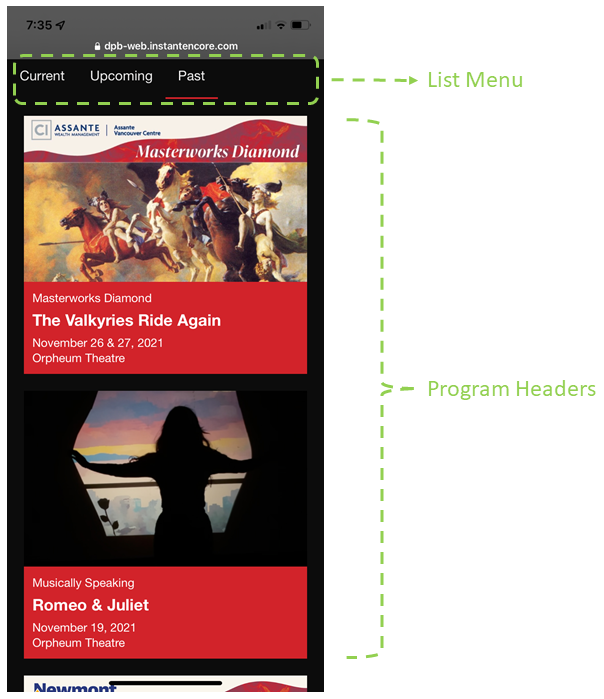
Example: Vancouver Symphony Orchestra
List Menu
When you make a program available for patrons to view, it will appear in one of three lists:
| List | Description |
| Current | Programs for today's events. |
| Upcoming | Programs for upcoming events. |
| Past | Programs for past events. |
The program's location will shift from Upcoming to Current to Past based on the program's Start Date and End Date.
- The Start Date defines when the program will begin appearing in the Current list.
- The End Date is the last day when the program will appear in the Current list.
- Published programs will appear in the Upcoming tab prior to the Start Date.
- They will appear in the Past tab after the End Date.
Program Headers
Each digital program is represented in the list with elements pulled from that program's Header.
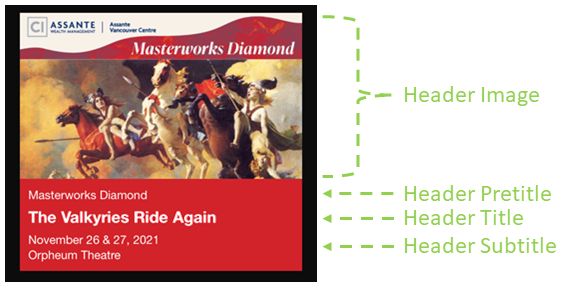
|
Element |
Description |
|
Image |
Image that represents the program. |
|
Pretitle |
Text above the title. |
|
Title |
Main text in the header. |
|
Subtitle |
Text under the title. |
Accessing Your Published Programs Page
You can access your Published Programs page from your account's Programs page in the control panel. The button is located in the upper right corner.
